The Pro generator is a precise instrument. It will faithfully render whatever you describe — including the parts you forgot to describe. If your subject has no face direction, the model will pick one. If you specify no lens, it will pick one. If you don't say "studio light", you'll get something that looks like a phone snap in a kitchen. Most "bad" Pro results aren't bad models. They're prompts that didn't tell the model enough.
This article gives you the structure that gets the model on your side.
A prompt is a list of decisions, not a sentence
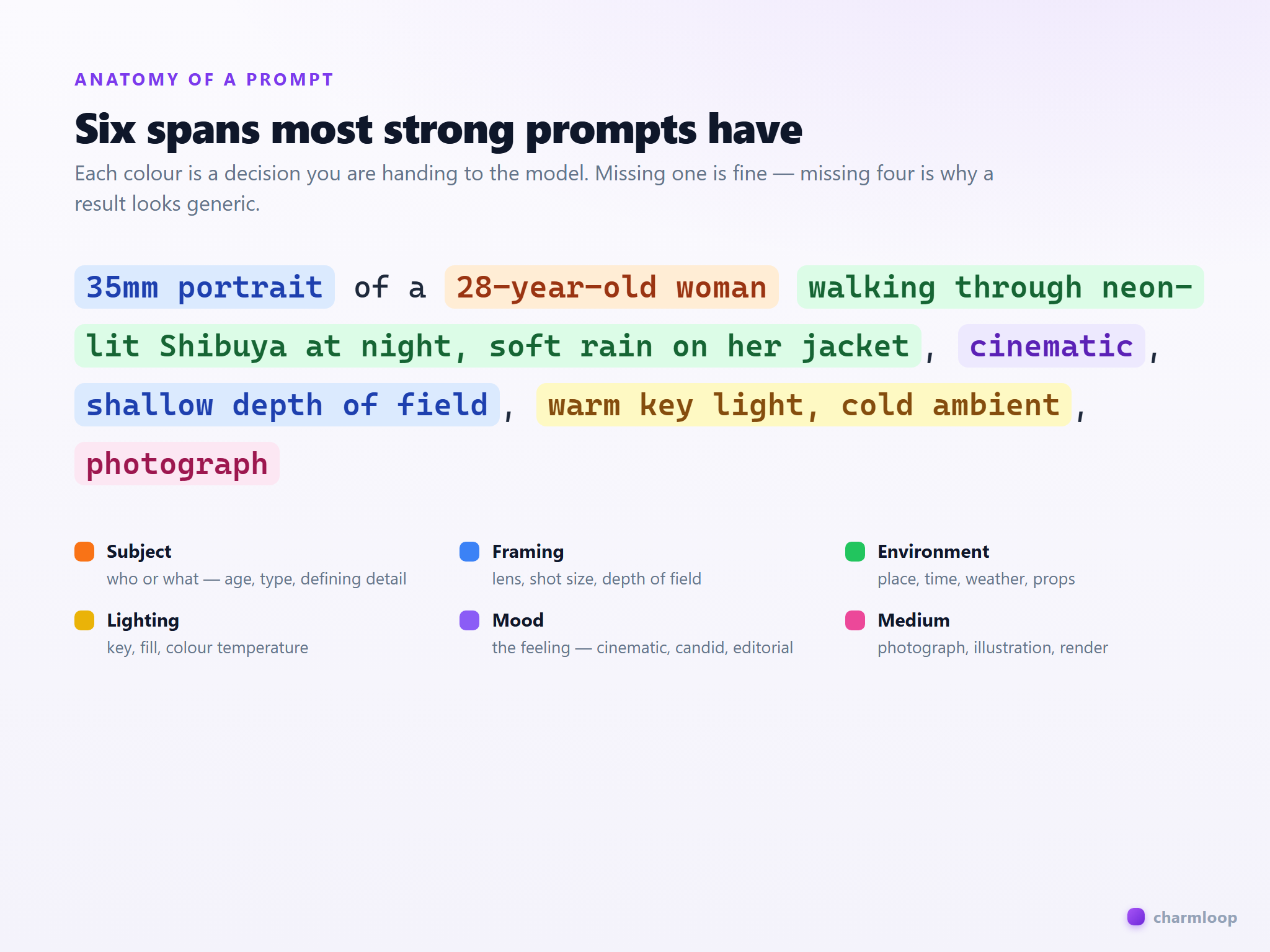
The Pro generator's positive prompt field accepts up to 10,000 characters, but the best prompts are usually 30–80 words. Treat each word as a deliberate decision: subject, framing, lighting, mood, style. If you can delete a word without changing the picture in your head, delete it.
girl in city
35mm portrait of a 28-year-old woman walking through neon-lit Shibuya at night, soft rain on her jacket, cinematic, shallow depth of field, warm key light, cold ambient, photograph
The weak version gives the model nothing to anchor — age, lens, lighting, weather, framing, medium are all left to chance. The strong version names every one of them, and the resulting render is reproducible.
The negative prompt is not optional
Open the Pro Prompts panel and you'll see two fields: positive and negative. New users skip the negative field. Don't. The negative prompt is where you tell the model what to actively avoid, and it's the single highest-leverage edit for fixing common SDXL failure modes: extra fingers, plastic skin, blurry eyes, off-axis composition.
A serviceable default negative for photoreal work:
low quality, blurry, jpeg artifacts, watermark, signature, text, extra fingers, deformed hands, plastic skin, cgi, 3d render
If you're going for illustration or a stylised render, drop cgi and 3d render — you may want one of those. The negative prompt is a vocabulary of veto, not a fixed string.
Specificity over volume
A common failure mode is stuffing a prompt with adjectives in the hope that more words equal more quality: "a beautiful stunning gorgeous breathtaking masterpiece of a girl". SDXL-family models do not reward this — they often collapse stacked synonyms into generic glamour shots. Replace adjectives with nouns. "Beautiful" is a feeling; "rim light, golden hour, freckles, cotton dress" is a picture.
amazing beautiful stunning portrait of a girl, masterpiece, best quality, 8k
portrait of a Black woman in her early thirties, freckles across the bridge of her nose, soft window light from camera-left, white cotton button-down, neutral grey background, 85mm, f/2
The strong version doesn't claim quality. It describes the conditions under which a quality image happens. The model takes the conditions and produces the quality.
Match the prompt to the model
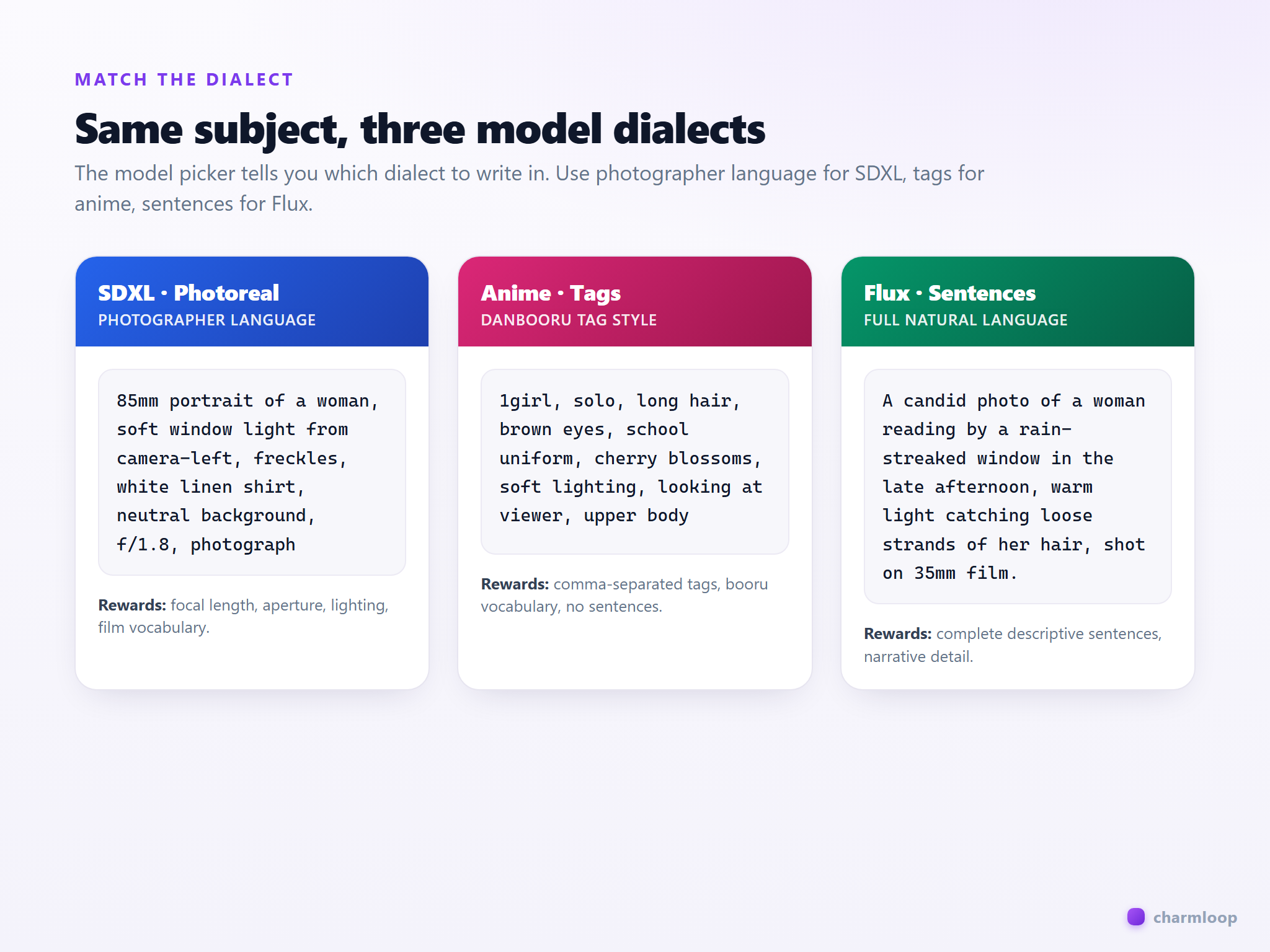
Charmloop's model catalog mixes photoreal SDXL checkpoints, stylised anime checkpoints, and a handful of Flux-family models. They speak slightly different prompt dialects. SDXL photoreal models reward photographer language — focal length, aperture, film stock, lighting brand names. Anime checkpoints reward danbooru-style tags. Flux models like full sentences.
Before you write the prompt, look at what model you have selected in the top bar of the Pro generator. If it's an SDXL realistic model and you've written 1girl, masterpiece, best quality, ultra-detailed, you've written an anime prompt — you'll get a stiff, over-sharpened, "AI-looking" result. Match the dialect.
What to leave out
You do not need to write masterpiece, best quality, 8k, ultra-detailed, professional photography on every prompt. Those tokens were copied out of the early SDXL community in 2023 and most of them either do nothing or actively pull the image toward over-processed slop. The Pro generator already uses sensible defaults for CFG (6.0) and steps (20) — these matter more for quality than any quality-claiming token in your prompt.
You also do not need to repeat the subject five times. "A young woman" + "she has red hair" + "her eyes are green" is three lines the model has to reconcile. Combine them: "young woman with red hair and green eyes". The model parses one subject more reliably than three.
Iterate on one variable at a time
When you don't like a result, the temptation is to rewrite the whole prompt. Don't. Change one thing — the lighting, the lens, the mood word — and regenerate. Set batch size to 2 or 3 in the Resolution panel so you see variance per change. Two generations with a one-word delta tell you more than ten generations with a full-prompt rewrite.
Lock your seed in the Resolution panel when you're isolating a variable. With a free seed, every regeneration scrambles composition and pose, and you can't tell whether the prompt edit helped. With a locked seed, the edit is the only thing changing.
Once you have a prompt you like, save it. The Pro Prompts panel has a bookmark icon — name the prompt and it shows up in your Saved prompts sheet for next time.
Next: see how to keep a single face consistent across multiple renders → Face identity.