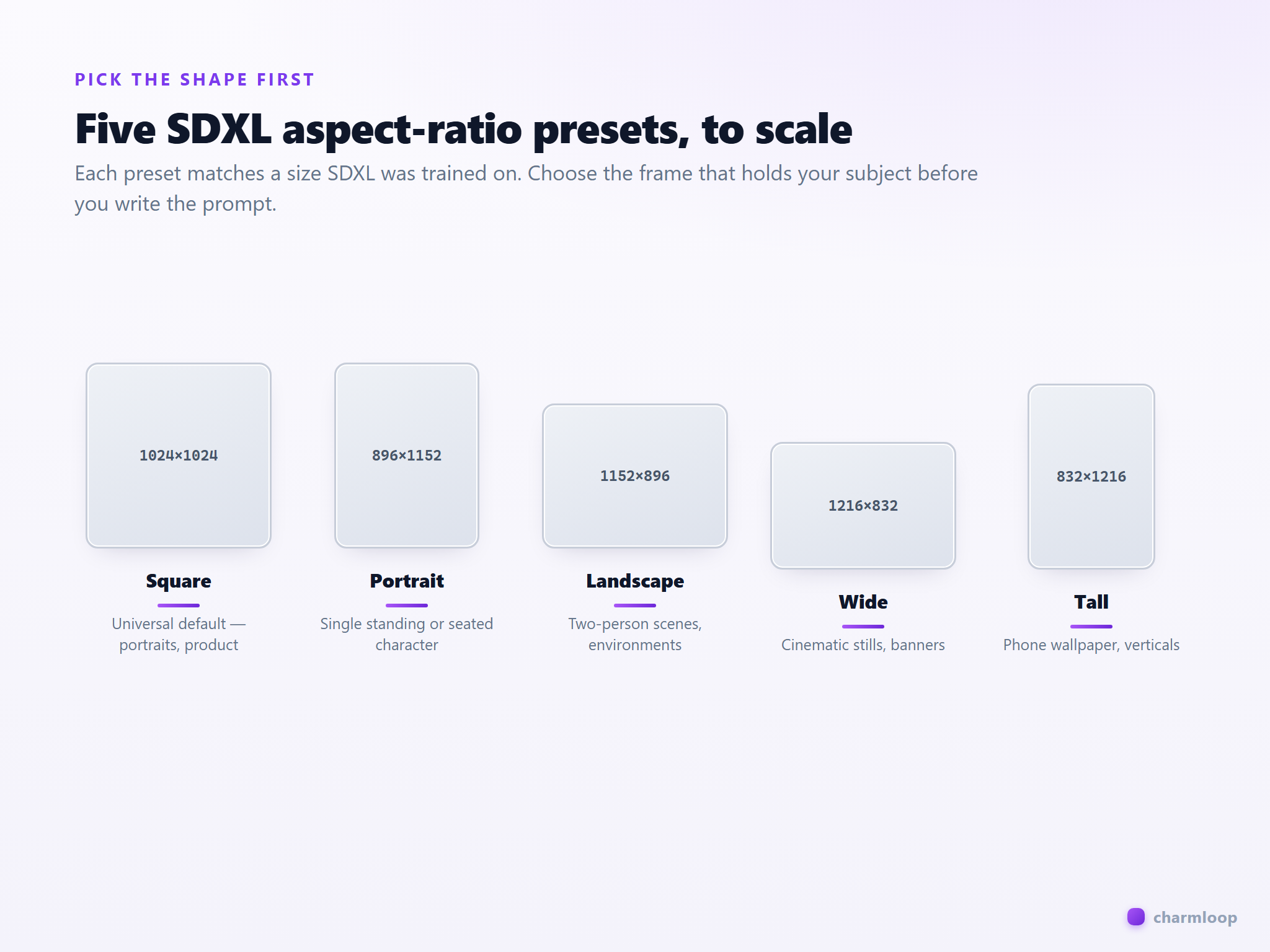
A great prompt with the wrong aspect ratio gives you a great image of the wrong thing. SDXL-family models were trained on specific dimensions and they compose differently at each one. Ask for a "full body shot" at 1:1 and the model will crop your subject's head and feet to fit the square. Ask for the same shot at 832×1216 and you get the full body, comfortably framed.
The Resolution panel is where you decide what the image is shaped like. Decide on purpose.
Pick the aspect ratio first, prompt second
Charmloop's Pro generator ships ten aspect-ratio presets in the Resolution panel, plus a Custom option. They aren't arbitrary — most of them match the dimensions SDXL was trained on, so the model handles them natively. The most useful for most work:
- SDXL Square (1024×1024) — universal default. Portraits, product, abstract. Always safe.
- SDXL Portrait (896×1152) — single human standing or seated, half- to full-body. Most flattering for character work.
- SDXL Landscape (1152×896) — two-person scenes, environment with a subject, cinematic stills.
- SDXL Wide (1216×832) — movie-still feel, banner crops, environments where width carries the story.
- SDXL Tall (832×1216) — phone-screen wallpaper, full-body verticals, fashion editorial.
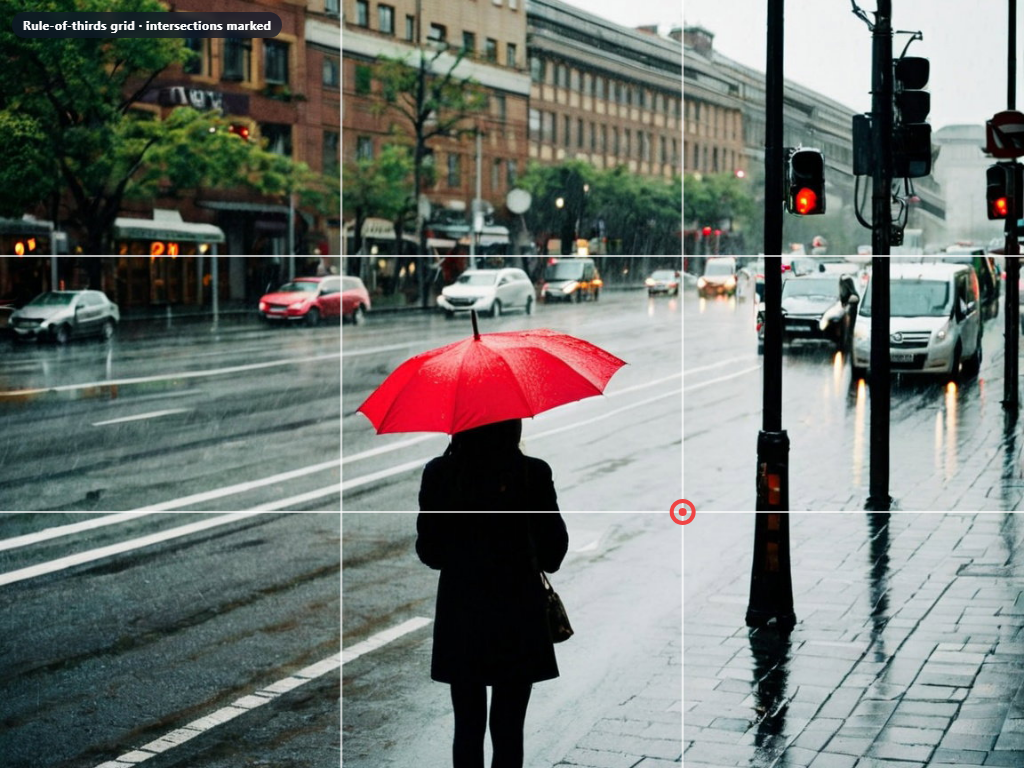
Rule of thirds works, and you can ask for it
The classical rule of thirds — placing the subject on the intersection of imaginary thirds-lines rather than dead centre — produces images that feel more alive. SDXL knows this language. Just say it in the prompt.
woman with red umbrella in the rain
woman with a red umbrella standing in the rain, framed using the rule of thirds with the subject in the right third of the frame, empty street and traffic lights blurred behind, cinematic, 35mm
The strong prompt names the compositional grid explicitly and tells the model where in the frame the subject should sit. The model follows the instruction far more often than not, especially in SDXL realistic checkpoints.
Other compositional words SDXL understands well: centered, low-angle shot, overhead view, Dutch angle, symmetrical composition, negative space, leading lines, foreground subject, blurred background. Use them.
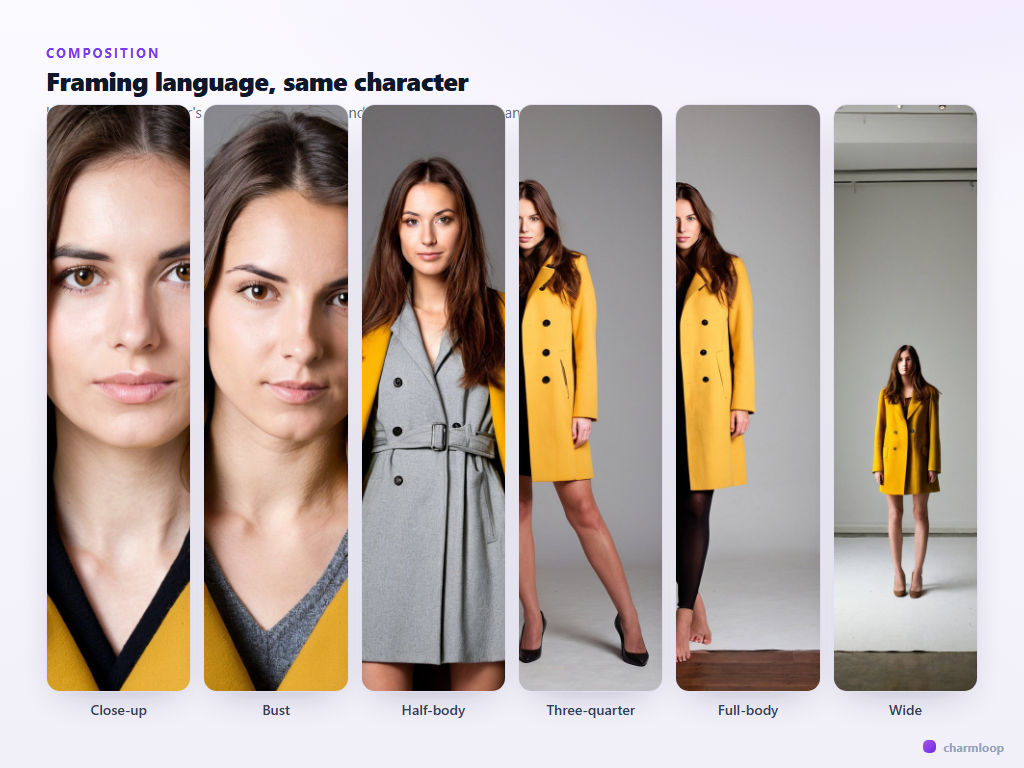
Framing language is more powerful than zoom
Beginners often try to control framing by adjusting dimensions or by writing "zoomed in" / "zoomed out". Don't. Use the framing terms photographers use. They're precise and the model has seen thousands of examples of each.
- close-up portrait — face fills most of the frame, chest visible.
- head-and-shoulders / bust shot — shoulders included, no chest.
- half-body — head to roughly waist.
- three-quarter shot / cowboy shot — head to mid-thigh.
- full-body — head to feet, with a small margin.
- wide / establishing shot — subject is small in a larger environment.
Lens choice changes the feel as much as the framing
Naming a focal length in the prompt is one of the highest-leverage edits you can make for photoreal work. Each lens has a distinct look the model knows:
- 24mm — wide, environment-rich, slight distortion at edges. Good for streetscapes and architecture.
- 35mm — natural, documentary, classic walking-around lens. Most "human in a scene" prompts benefit.
- 50mm — neutral perspective, close to the human eye. Default for portraits if unsure.
- 85mm — compressed, flattering portrait lens. The standard for shallow-DoF headshots.
- 135mm — very compressed background, bokeh-heavy. Beautiful for tight portraits.
Pair with an aperture: 85mm, f/1.8 for shallow depth of field; 35mm, f/8 for sharp environmental work.
Match aspect ratio to lens and framing
These three choices interact. A "full-body shot at 85mm" wants a portrait or tall aspect — there isn't room horizontally to fit a person at full-body in a wide frame without the model cheating. A "wide establishing shot of a street" wants a wide or landscape aspect — squeezing it into 1:1 forces the model to crop the story.
A rough mapping:
| You want… | Aspect | Lens | Framing word | |---|---|---|---| | Tight portrait | Square or Tall | 85mm or 135mm | close-up / bust | | Walking-around character | Portrait or Tall | 35mm or 50mm | half-body or three-quarter | | Action / sport / two people | Landscape or Wide | 35mm | wide or three-quarter | | Environment with a subject | Wide | 24mm or 35mm | wide / establishing | | Phone wallpaper | Tall | 50mm | half-body |
Batch size is a composition tool
Set batch size in the Resolution panel to 2 or 3 when you're exploring composition. With a single batch, you have to guess whether you got an "average" composition or an outlier. With a batch of three, you see the model's range for that prompt — pick the one that frames best and lock its seed for refinement.
Once you've found the composition that lands, drop batch back to 1 to save charms while you iterate on prompt and post-processing.
Next: once you have a render you like, how do you make it better without starting over? → Refinement.